This is Part 2 of the Remote Agent Workflow series.
In the previous article, I built a practical remote terminal workflow:
Phone -> Tailscale -> SSH -> Mac -> tmux -> Codex
That setup solved the first problem: how to reach my Mac when I am away from my desk, and how to keep long-running local agent tasks alive after my phone disconnects.
It was useful immediately.
But after using it in practice, I found a second problem.
SSH solves connectivity. It does not automatically create a good remote development workflow.
The more I used mobile SSH, the more obvious the boundary became:
A phone should not be a tiny terminal.
A phone should be a control plane for local agent workflows.
The First Layer Was Infrastructure Link to heading
The remote terminal setup was still necessary.
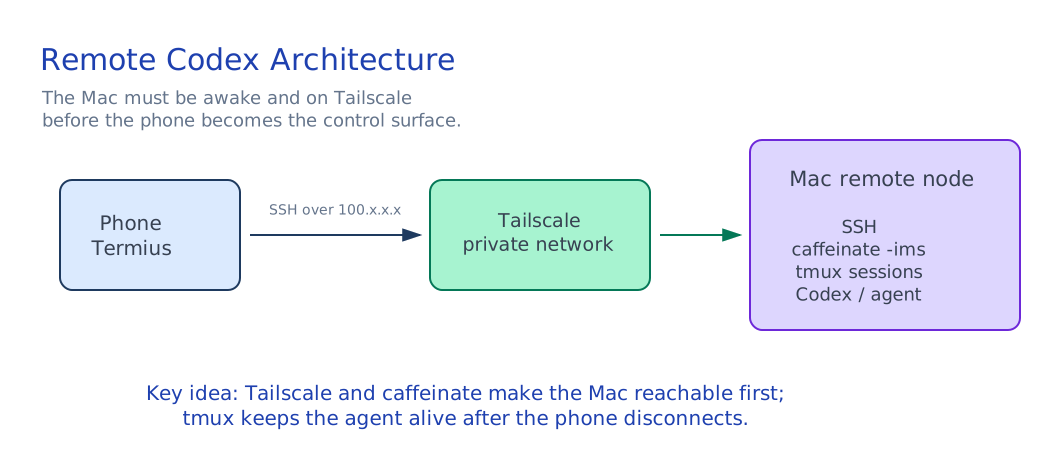
I needed:
- Tailscale so my phone could reach my Mac without exposing SSH to the public internet.
- SSH so I could log in securely.
- tmux so long-running tasks could survive disconnects.
- caffeinate so the Mac would not go to sleep during agent work.
This gave me a reliable baseline:
I can connect.
I can start work.
I can disconnect.
I can reconnect later.
That is a meaningful step.
But it only answers the infrastructure question:
Can I reach the machine?
It does not answer the workflow question:
Can I comfortably drive long-running AI development from a phone?
For me, the answer was no.
A Phone Is a Bad Terminal Link to heading
Mobile SSH is excellent for emergency access.
It is not a good daily interface for coding agent work.
The problems are small individually, but they compound quickly:
- Long prompts are awkward to type on a phone keyboard.
- Shell editing shortcuts are clumsy.
Ctrl,Esc,Tab, and arrow-key workflows are not natural on iOS.- Logs are hard to scan on a narrow screen.
- Switching between tasks is slow.
- Reattaching tmux sessions is friction.
- Recovering context still depends too much on human memory.
The real issue is not Termius, SSH, or tmux. They are doing their jobs.
The issue is abstraction.
When I use a phone as a terminal, I am pretending the phone is a small laptop. That is the wrong model.
The phone is good at:
- sending a short instruction
- checking status
- approving a pending action
- reading a concise result
- stopping or continuing a task
The phone is bad at:
- typing long commands
- managing process trees
- scrolling raw logs
- reconstructing project state
- manually coordinating multiple agent sessions
So the next step is not a better mobile shell theme.
The next step is a different control surface.
Remote Shell vs Agent Workflow Link to heading
Remote shell means:
I remotely operate the computer.
Agent workflow means:
I send an intent, and a local runtime executes it.
Those are different models.
| Dimension | Remote Shell | Agent Workflow |
|---|---|---|
| Interface | Commands | Tasks and intent |
| Phone UX | Fragile | Lightweight |
| State | Current shell session | Repository files and logs |
| Long-running work | tmux session | Task record |
| Recovery | Manual | Reconstruct from repo state |
| Best use | Emergency access | Daily remote development |
The shell is command-oriented.
An agent workflow should be task-oriented.
From the phone, I do not want to manually type:
cd ~/Project/my-repo
tmux attach -t codex
git status
python3 orchestrator.py --max-rounds 1
I want to say something closer to:
Continue the current feature. Read the repo state first, run the orchestrator for one round, and send me the result.
That instruction should be handled by a local runtime on the Mac.
The Control Plane Model Link to heading
The architecture I want looks like this:
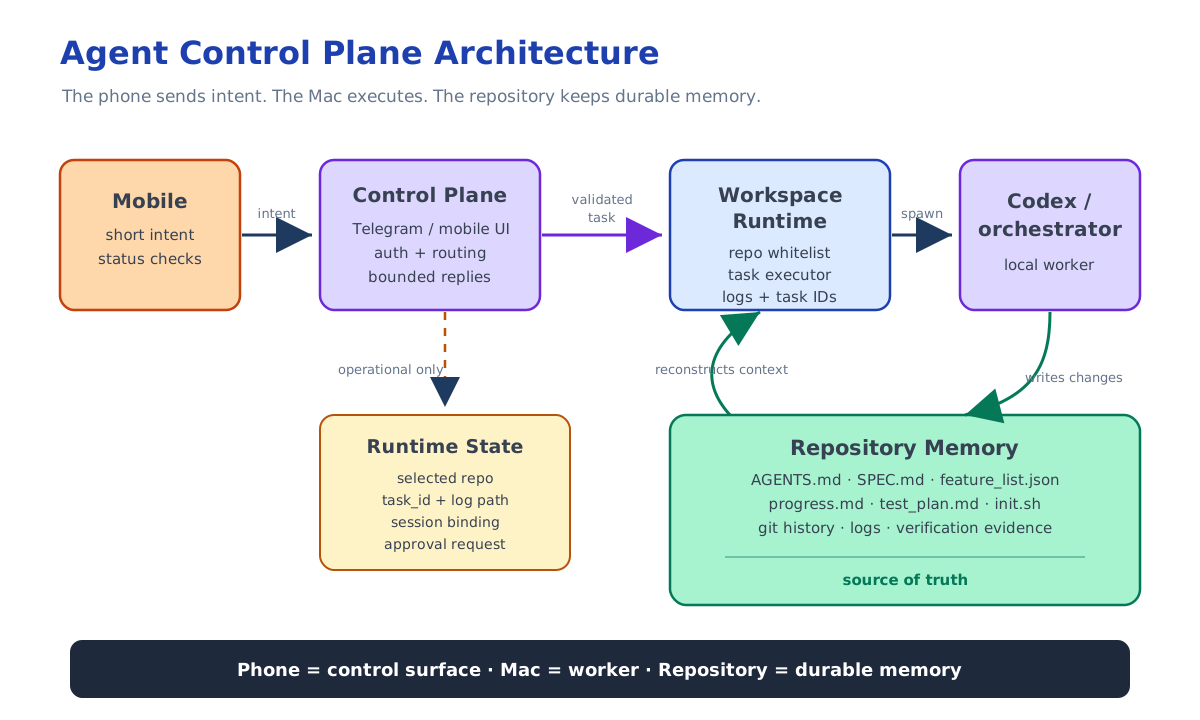
Mobile Client
  -> Control Plane
  -> Workspace Runtime
  -> Codex / orchestrator
  -> Repo State + Logs
The phone is only the control surface.
The Mac remains the worker.
That matters because the Mac already has:
- the local repositories
- git credentials
- development tools
- environment variables
- test harnesses
- Codex or other local agents
- project-specific scripts
I do not want to move all of that into the phone.
I also do not necessarily want to move it into a cloud environment.
The goal is more modest:
Keep execution local.
Make control mobile-friendly.
What the Control Plane Should Do Link to heading
A lightweight control plane does not need to write code itself.
Its job is to expose a safer and simpler remote interface to the local runtime.
For example, it can provide commands like:
/repos
/use <repo>
/agent <instruction>
/agent new <instruction>
/agent resume <session_id> <instruction>
/agent session
/status
/logs <task_id>
/stop <task_id>
Those commands are not a replacement for Codex.
They are a boundary around Codex.
The control plane should handle:
- authorization
- repository selection
- workspace validation
- task creation
- task logs
- task status
- session continuation
- approval forwarding
- bounded mobile responses
It should not become the owner of the development process.
It should not invent feature state.
It should not rewrite project planning files by itself.
It should not treat chat history as the project database.
The control plane is a remote entry point, not the source of truth.
Durable State Belongs in the Repository Link to heading
This became the most important principle:
Chat history is not durable project state.
For long-running agent work, the project must be recoverable even if:
- the phone disconnects
- the terminal session is lost
- the Codex thread changes
- the bot restarts
- the agent gets interrupted
- I continue the work hours later
That means the durable state should live in the repository:
AGENTS.mdSPEC.mdfeature_list.jsonprogress.mdtest_plan.mdinit.shorchestrator.py- git history
The agent should be able to reconstruct context from files.
The phone message should only provide the next instruction.
This changes the role of the human as well.
Instead of manually driving every shell step, I should be able to send a high-level instruction:
Add this requirement. Update the spec and feature list first, then run the orchestrator for one verified feature round.
The local runtime should know how to turn that into repository work.
Why This Is Not Just Automation Link to heading
It is tempting to describe this as automation, but that is not quite right.
Automation usually means:
Run this fixed script.
A remote agent workflow means:
Preserve the project state, delegate the next goal, verify the result, and continue later.
That requires more than a script.
It needs:
- a constrained entry point
- a selected workspace
- a task record
- a log trail
- a recoverable repo state
- a verification command
- a way to resume or stop work
This is why mobile SSH was only the first layer.
It gave me access to the machine.
But the workflow still needed structure.
The Next Step Link to heading
The next layer I am building is a Telegram-based control plane for local Codex work.
The important design choice is polling:
Local Mac bot -> Telegram Server
Instead of webhook mode:
Telegram Server -> public HTTPS endpoint
With polling, the Mac can receive Telegram commands without:
- public IP
- inbound port mapping
- HTTPS endpoint
- ngrok
- Cloudflare Tunnel
That fits the same philosophy as the first article:
Do not expose the Mac directly to the public internet.
Keep the worker local.
Make the control surface reachable.
But the key idea is not Telegram itself.
Telegram is only one possible mobile client.
The deeper idea is:
Remote terminal is infrastructure.
Agent control plane is workflow.
Repository state is memory.
That is the direction I want this remote AI development setup to move toward.